Local PII redaction · Early access
Privacy Redactor
for ChatGPT.
For professionals trusted with personal information, Privacy Redactor is a local prompt-review tool that helps remove confidential details before using AI. It detects potential identifiers on your device and lets you choose what to keep, redact, and share.
For people trusted with patient, client, student, and member information.
For ChatGPT · Early access · Detection runs on your device
Your original text
Draft a reply to Alex Morgan at alex@example.com about the project timeline.
What ChatGPT will see
Draft a reply to [PERSON] at [EMAIL] about the project timeline.
You review the result before anything is sent to chat.
Start with your next prompt
PII redaction for
ChatGPT prompts.
Client emails. Meeting notes. Draft documents. Everyday AI tasks often start with text that contains information you didn’t mean to share.
Privacy Redactor brings local PII redaction software into a private panel inside ChatGPT. Find names, email addresses, phone numbers, and other detected personal information in your text, then decide what stays before sending your prompt.
A practical guide
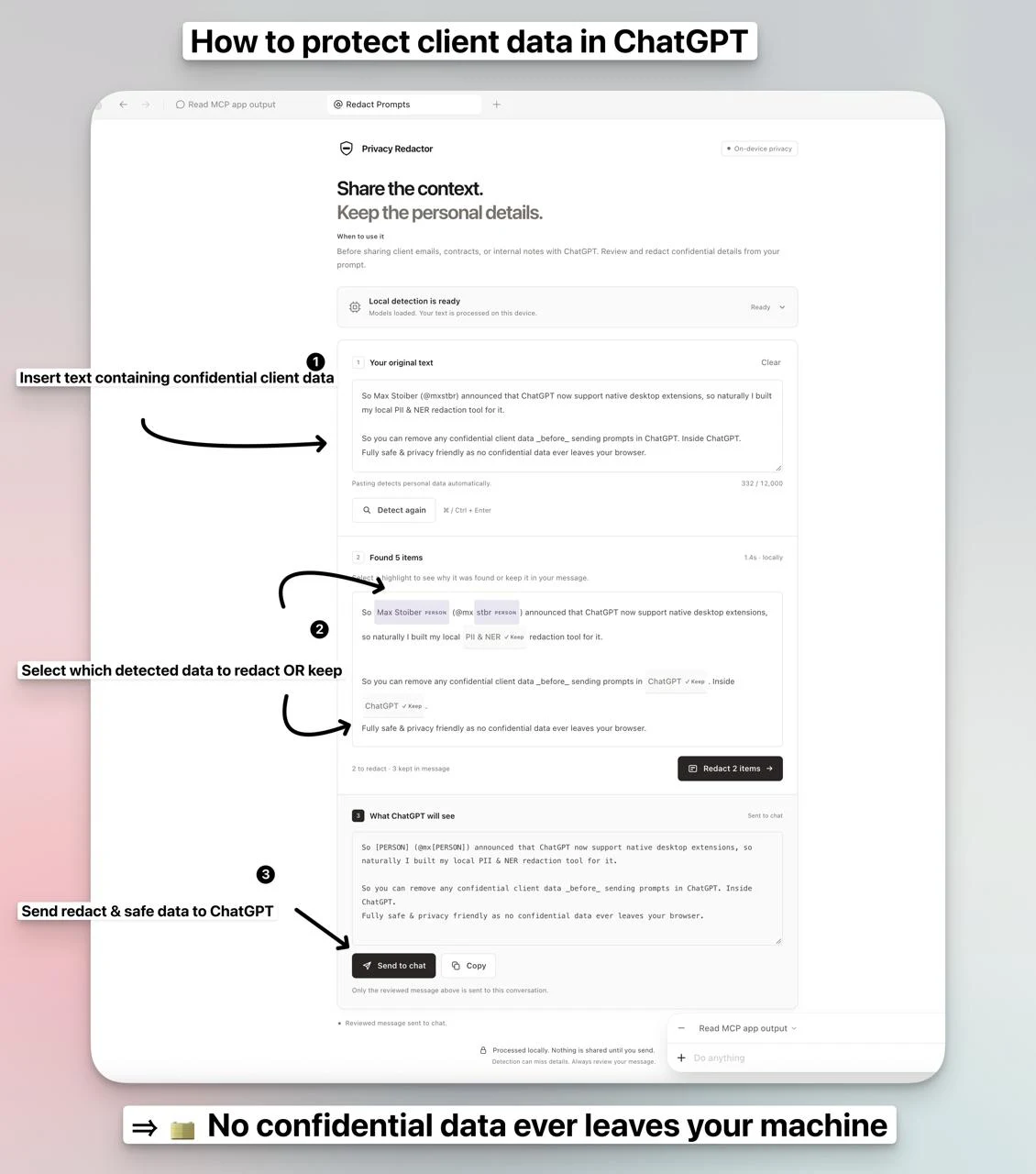
How to protect client data in ChatGPT in 3 easy steps
Before sharing a prompt, use Privacy Redactor to find personal details, choose what to remove, and review what you send.
- 01
Paste your client text
Open Privacy Redactor inside ChatGPT. Paste your client email, meeting notes, or draft into the plugin’s private panel to detect personal details locally.
- 02
Choose what to redact or keep
Select each highlighted item to review it. Keep the context you need, then click Redact to replace the details you want to remove.
- 03
Send the reviewed prompt
Read the ‘What ChatGPT will see’ preview and check for anything the detector missed. When you’re ready, click Send to chat to share the redacted version.
Models download during setup; detection runs locally. Automated detection can miss details, so always review your prompt before sharing it.
Early access
Bring Privacy Redactor into ChatGPT.
Privacy Redactor is currently available through early access. Request installation details to try the plugin with your team.
Before you get started
Questions about redacting personal information
Is the tool available, and do I need to buy a licence?
The browser version is publicly available and free to use, with no registration or licence purchase required. The ChatGPT plugin is currently available through early access. Contact richard@procurato.de to discuss access for your team or institution.
What are the minimum device requirements?
The device you use must meet the technical requirements for local processing: a compatible browser or host with WebGPU support, several GB of free memory, and enough storage for the initial model download of about 1.1 GB. Model files are cached when available. If your device or browser does not meet these requirements, the tool may not run.
Who is Privacy Redactor for?
For professionals trusted with personal information, Privacy Redactor is a local prompt-review tool that helps remove confidential details before using AI. It detects potential identifiers on your device and lets you choose what to keep, redact, and share. For doctors, psychologists, lawyers, contractors, professors, and trainers working in hospitals, practices, universities, gyms, and other organisations that handle patient, client, student, or member information.
Can I use it to test an AI provider my institution has not approved?
Exploring a new AI provider? Use synthetic examples or material your institution permits you to share. Redaction helps reduce disclosure; it does not override an approved-provider list, guarantee anonymisation, or establish compliance with a confidentiality clause.
What is PII redaction?
PII means personally identifiable information, such as names, email addresses, and phone numbers. PII redaction removes or replaces detected details in text. Privacy Redactor uses placeholders such as [PERSON] and [EMAIL] to help preserve the context of your prompt.
What can I redact before sharing a ChatGPT prompt?
Paste text from client emails, meeting notes, or draft documents into the private panel. The models look for personal information, and you choose which detections to redact or keep. This is a text-redaction workflow; it does not edit uploaded PDF files. The current detection models focus on English.
Does Privacy Redactor upload my original text?
The redaction app processes your pasted text locally on your device. Models and runtime files download during setup. Only when you click Send to chat does the reviewed result go to the conversation, including any details you chose to keep.
Does it automatically redact ChatGPT’s main prompt box?
No. Paste into Privacy Redactor’s private panel inside ChatGPT, review the detections, and send the redacted result from there. It does not intercept typing or pasting in the main ChatGPT prompt box.
Is redacted text completely anonymous?
Not necessarily. A text anonymizer or PII redaction tool can miss personal details, and the remaining context may still identify someone. Always review the final prompt, including details such as project names or unusual circumstances, before sharing it.
How do I install Privacy Redactor for ChatGPT?
Request an early-access installation from Procurato using the button on this page. Privacy Redactor is not yet published in the ChatGPT plugin directory. Initial setup downloads approximately 1.1 GB of models and requires a compatible host with WebGPU support.
For your whole team
Make privacy part of
how you use AI.
For doctors, psychologists, lawyers, contractors, professors, and trainers working in hospitals, practices, universities, gyms, and other organisations that handle patient, client, student, or member information.
Evaluating AI for your institution or working under confidentiality clauses? We help you define what can be shared and where local redaction fits your workflow.
richard@procurato.de